Christmas Strava theme: create a Christmas-colored image of your activity
Christmas bike ride, Santa run, December trail or a jog under the fairy lights: your activity deserves more than the default orange map. Beautiful GPX offers a ready-made Christmas theme to turn your Strava route or GPX file into a Christmas-colored image to share or print.
Free, no account. The theme is applied as soon as the editor opens.
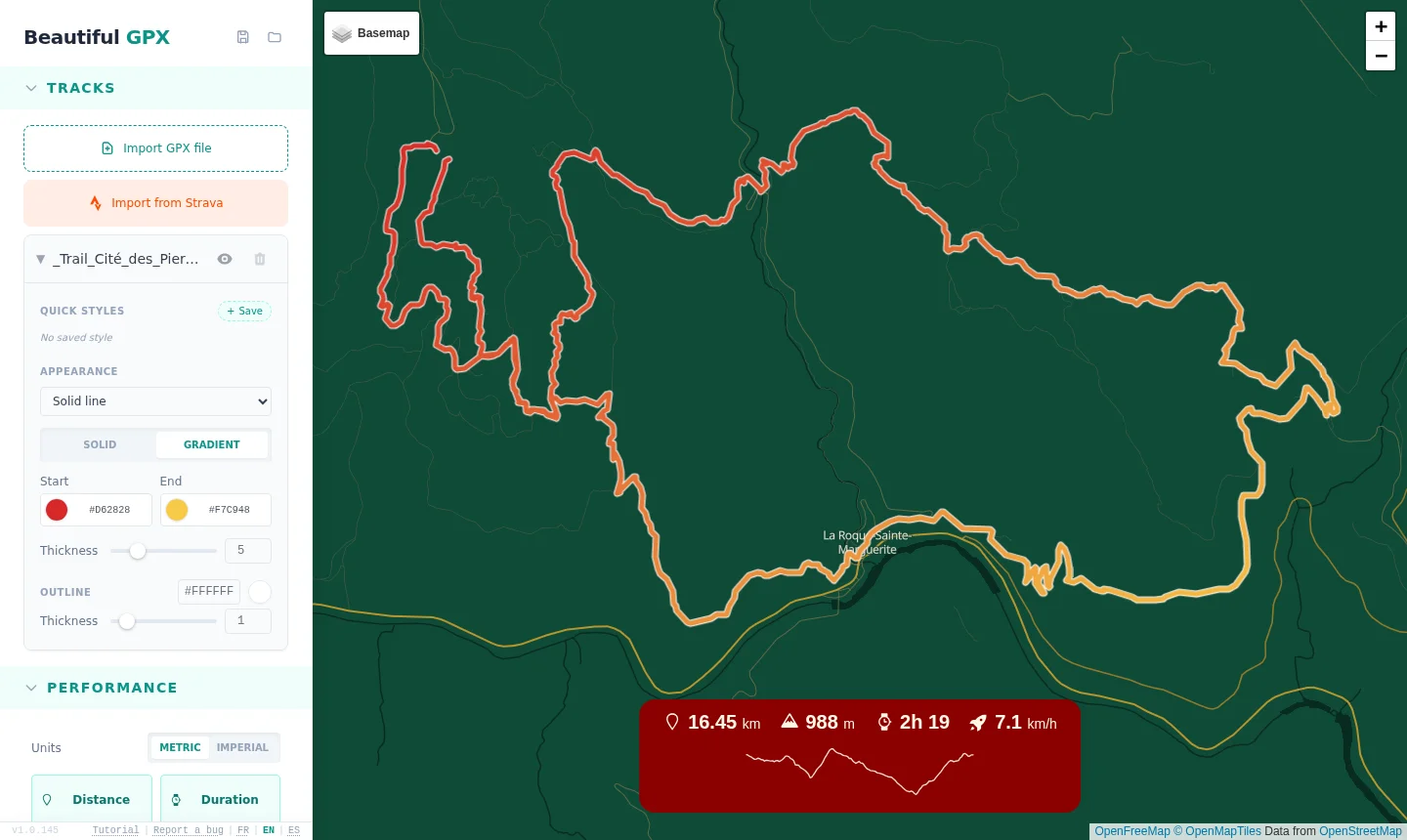
An example: a 16 km trail with the Christmas theme
Here is the result on a real trail: just open the editor with the Christmas theme and import the GPX file. The basemap, route and stats are styled in one go, with no tweaking.
1 A fir-green basemap
The “Christmas” basemap replaces the standard map with a deep fir-green backdrop, with gold and cream roads reminiscent of garlands.
- Water, parks and roads harmonized in a green and gold palette
- A clean look where the route stays the star
- Also available in the editor’s basemap list
2 A red and gold gradient route
The route fades from Santa red to gold, with a thin white outline, like a string of lights winding across the image.
- Route color gradient, fully editable
- Width, outline and style (solid, dashed) adjustable
- A transparent background is possible to place the route over your Christmas photo
3 Christmas-colored stats
The performance block uses deep red, cream and gold: distance, elevation, time, pace and elevation profile.
- Choose the displayed data and units (km or miles)
- Background, text and border colors are customizable
- Block can be moved and resized on the map
4 Seasonal POIs and labels
Add a “Santa’s chalet” start, a finish point or stops, with handwritten fonts and custom markers.
- Handwritten fonts (Caveat, Pacifico, Amatic SC…)
- Label, dot and outline colors of your choice
- Automatic POIs: start, finish, towns along the way
How to create your Christmas-colored Strava image in 4 steps
- Click “Apply the Christmas theme”: the editor opens with the basemap, route colors and stats block already set.
- Import your activity from Strava or drop your GPX file.
- Tweak anything you like: colors, POIs, stats, transparent background.
- Export a high-resolution PNG for social media or print.
FAQ
Is the Christmas Strava theme free?
Yes, Beautiful GPX is free and requires no account.
Do I need to connect my Strava account?
No, you can simply import a GPX file. Strava connection is optional to fetch your activities.
Can I change the theme colors?
Yes, the theme is only a starting point: basemap, route, stats and POIs are fully editable.
Can I put my route over a Christmas photo?
Yes, enable the transparent background and export a PNG to overlay the route on your image.
Is my data sent to a server?
Processing happens in your browser; your routes are not stored on our servers.
This year, give your December outing a Christmas-colored image.
🎄 Apply the Christmas theme